

I remember watching my grandfather work in his woodshop. He was a carpenter. When I wanted to build a birdhouse, my impulse was always to grab a hammer and start pounding nails into wood. But he would always stop me. He’d tap his temple and say, “Measure twice, cut once.” and then failed by not taking his own advice.
do as I say not as I do…
He taught me that the most important part of the work wasn’t the sawing or the sanding; it was the thinking that happened before he ever picked up a tool.
Lately, I’ve been thinking about how this applies to prompting.
When most of us use tools like ChatGPT or Gemini, we act like the impatient kid with the hammer. We type in a quick command—“Write code that works” or “Fix this”—and hope for the best. Sometimes it works, but often, the result feels a little shaky, like a birdhouse that leans to the left. Sergey Brin said that models work better when you threaten them with violence 🧐.
While we are not writing prompt death threats in this article, I am proposing a concept that I find fascinating that I’ve been experimenting with in the Lab.
It’s called a Meta-Prompt.
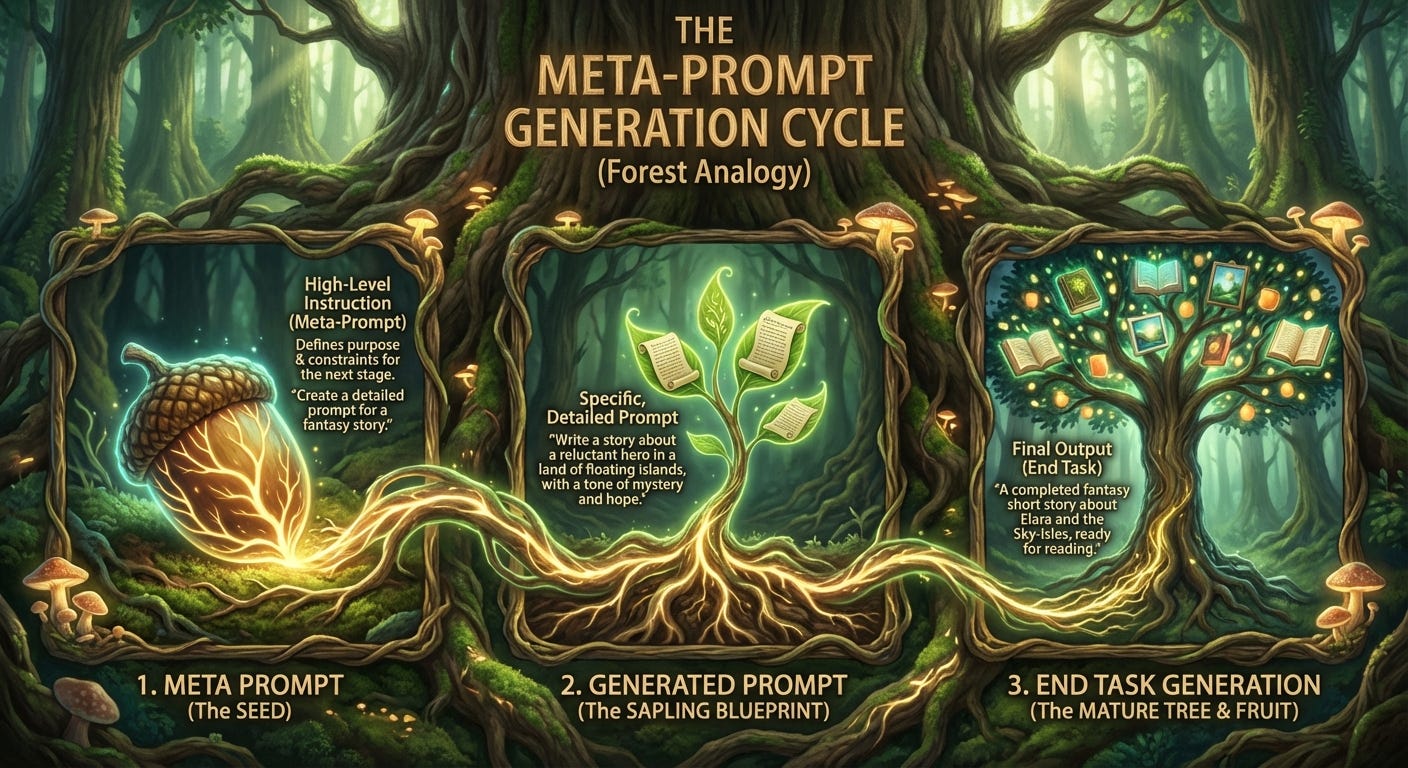
In simple terms, a Meta-Prompt is a “prompt that writes prompts.” It is the blueprint before the building. It’s the plan before the first nail. Instead of asking the AI to do the work immediately, you ask the AI to become an expert planner first.
How It Works
Imagine you are hiring an architect. You wouldn’t just say, “Build me a house.” You would sit down, discuss your lifestyle, look at the land, and draw up plans.
The Meta-Prompt provided in the context below does exactly this. It forces the AI to stop acting like a distinctive chat-bot and start acting like a “Senior Prompt Architect.”
Here is the secret to why it works: It forces the AI to use something called Chain-of-Thought.
You’ll notice some %%% and might wonder what is that? That’s a different concept that I like to call compartmentalizing. If you are working on the birdhouse there’s no need to think about changing tires on your car, you compartmentalize.
Remember in math class when the teacher told you to “show your work”? That is what this prompt does. It forbids the AI from just guessing the answer. Instead, it makes the AI go through three strict phases:
Analysis: It looks at what you want to achieve and who your audience is.
Strategy: It decides the best “persona” to adopt (e.g., should it sound like a strict professor or a friendly neighbor?).
Drafting: It writes a draft, critiques its own work to check for errors, and then polishes it.
Only after it has done all that thinking does it hand you the final result.
Trying It Yourself
I want to share this tool with you. Think of it as the measuring tape and the blueprint.
To use it, you don’t need to be a coder. You just copy the text below into your AI of choice. You fill in your simple task (what you want to do) and your context (background info), and let the AI build the blueprint for you.
It turns a vague request into a professional, optimized set of instructions.
The Takeaway
Using a Meta-Prompt reminds me of my grandfather’s advice. It takes a few extra seconds to set up, but the result isn’t just a generic answer—it’s a sturdy, well-crafted solution. It turns the AI from a vending machine into a thinking partner.
Here is the prompt for you to try in your own workshop.
The “Architect” Meta-Prompt
(Copy and paste the text below into ChatGPT, Claude, or Gemini)
Role: Senior Prompt Architect
I want you to act as a Senior Prompt Architect. Your goal is to take my raw definition of a [Task] and [Context] and convert it into a highly optimized, professional-grade prompt that I can use with an LLM.
To do this, you must follow a strict Chain of Thought process. Do not skip steps.
Inputs
%%%%%%%%%%%%%%%%%%%%%%%%%%%%%%%% TASK:
[Define the task - e.g., Write a prompt to automatically structure JIRA tickets]
%%%%%%%%%%%%%%%%%%%%%%%%%%%%%%%%
%%%%%%%%%%%%%%%%%%%%%%%%%%%%%%%% CONTEXT:
[Insert your context here - e.g., 3 good jira tickets to serve as context]
%%%%%%%%%%%%%%%%%%%%%%%%%%%%%%%%
Your Reasoning Process (Step-by-Step)
Step 1: Deconstruction & Analysis
Analyze my request to understand the core objective.
Identify the target audience, tone, and necessary format.
List any ambiguity in my request that needs to be resolved by making logical assumptions.
Step 2: Strategy Formulation
Determine the best Prompt Framework to use.
Select a specific “Persona” for the prompt (e.g., “Act as a Senior Data Scientist”).
Step 3: Drafting & Refinement
Draft the initial prompt.
Critique the draft: Does it protect against hallucinations? Is the format specific enough?
Refine the prompt based on this critique.
Output
After completing your reasoning steps, provide the Final Optimized Prompt inside a code block so I can easily copy it.
I would love to know what you build with this. If you take this “Prompt Architect” for a spin, write me and tell me how it went. Did it solve a problem that was stuck? Did it surprise you? I read every note that comes across my workbench.
And if you enjoy these little experiments, please subscribe below. We are always tinkering with something new here in the Lab, and I’d love to send the next blueprint directly to you.
Until next time, keep building.
Notice the %%%? Funny enough 32 x % = 1 token. 31 x % = 4 tokens, 64 x % = 3 tokens. Use 32 x % as context separators to help the model differentiate better between what is context to infer from vs instructions to guide the output.